工具项目
BurpSuite明动插件
资产安全巡检平台项目
Nuclei漏扫图形化工具
Nuclei POC辅助编写
分布式资产测绘监控
POC漏检模板管理工具
POC管理与漏检工具
Java幽灵比特位绕过神器
一键扒光虚拟机所有密码
Java内存马生成网页版
263+上传漏检绕过工具
ID注册查询社工利器
Linux后渗透利用神器
全能攻防协议连接神器
聚合多源情报推送监控
应用敏感信息提取神器
分布式资产扫描平台
交互式载荷生成平台
Java审计的瑞士军刀
容器镜像集群扫描器
渗透命令全速查平台
AI驱动日志安全分析系统
AI流量抓包解密利器
BurpSuite26.4专业稳定版
小程序一键反编译带挖掘
渗透测试引导工具箱
一键提取加载分析JS插件
DLL代理与侧载生成器
K8s攻击路径测绘引擎
JS安全分析提取工具
蓝队分析研判工具箱
内存取证可视化工具
小程序安全调试工具
敏感信息提取扫描神器
云安全AK/SK泄露利用工具
Java反序列化GUI工具
HackingTool终端工具箱
可视化未授权访问漏测工具
轻量化红队渗透工具箱
WX小程序安全审计Skill
C#安全内网渗透工具集
JS只能解密渗透测试框架
Linux本地提权通杀项目
自动化信息泄露侦察工具
用户账户调查情报工具
基于API探测路径BP插件
红队自动化巡航扫描框架
OpenArk响应逆向工具箱
自动化泄露资产测绘工具
API接口自动化测试工具
网络设备基线排查工具
LLM大模型红队测试框架
JX逆向发调试浏览器插件
反蜜罐反溯源浏览器插件
DudeSuite渗透测试工具
Yakit增加AI自动FUZZ
安全渗透测试工具箱
Linux本地提权集合版
Python逆向工程集成工具
AI渗透测试蜂群项目
免杀致盲底层驱动BYOVD
一键挖掘敏感信息泄露
Jeecg综合漏洞利用工具
内网扫描服务探测工具
BP短信辅助绕过插件
Java内存马检测工具
Burp/Yakit平替抓包项目
WIN系统红队Rootkit项目
WIN系统红队Rootkit项目2
AI大模型设备安全基线排查
网络安全扫描分析平台
桌面化安全测试工具集
K8s综合渗透测试工具
Chrome扩展页面资产梳理
Shiro漏洞利用增强版
端口进程应急管理工具
自动化信息泄露侦察工具
渗透测试利器安全平台
WAF检测与绕过工具
Skills网络安全技能库
综合渗透测试工具集
全网搜索用户社工利器
自研新型C2(LeekShell)
Skill供应链扫描神器
蓝队进程内存扫描工具
快速查找设备应用弱口令
AI驱动后渗透综合平台
魔改版FScan扫描器
小迪安全知识库
-
+
首页
API接口自动化测试工具
API接口自动化测试工具
### 一款专为渗透测试人员打造的 API 接口自动化安全检测工具 [](https://github.com/11firefly11/ApiHunter#-%E4%B8%80%E6%AC%BE%E4%B8%93%E4%B8%BA%E6%B8%97%E9%80%8F%E6%B5%8B%E8%AF%95%E4%BA%BA%E5%91%98%E6%89%93%E9%80%A0%E7%9A%84-api-%E6%8E%A5%E5%8F%A3%E8%87%AA%E5%8A%A8%E5%8C%96%E5%AE%89%E5%85%A8%E6%A3%80%E6%B5%8B%E5%B7%A5%E5%85%B7) 🏠功能介绍 • 🚀快速开始 • 📖使用指南 • 🔧检测模块 * * * ## ✨ 项目特点 [](https://github.com/11firefly11/ApiHunter#-%E9%A1%B9%E7%9B%AE%E7%89%B9%E7%82%B9) ApiHunter 是一款功能强大的 API 接口安全检测工具,专为渗透测试人员和安全研究人员打造。无需复杂的配置,支持 Swagger/OpenAPI 和 ASP.NET Help Page 文档一键导入,自动解析接口、智能填充参数、批量测试,并提供强大的敏感信息检测和漏洞扫描功能。 项目地址:https://github.com/11firefly11/ApiHunter ## 快速开始 [](https://github.com/11firefly11/ApiHunter#-%E5%BF%AB%E9%80%9F%E5%BC%80%E5%A7%8B) **使用前请确保已获得目标系统的合法授权,本工具仅用于授权的安全测试。** 1. **启动程序** * 双击 `ApiHunter.exe` 即可启动,开箱即用。 2. **开始任务** * **方式一(单目标)**:输入 URL 和接口路径,点击测试。 [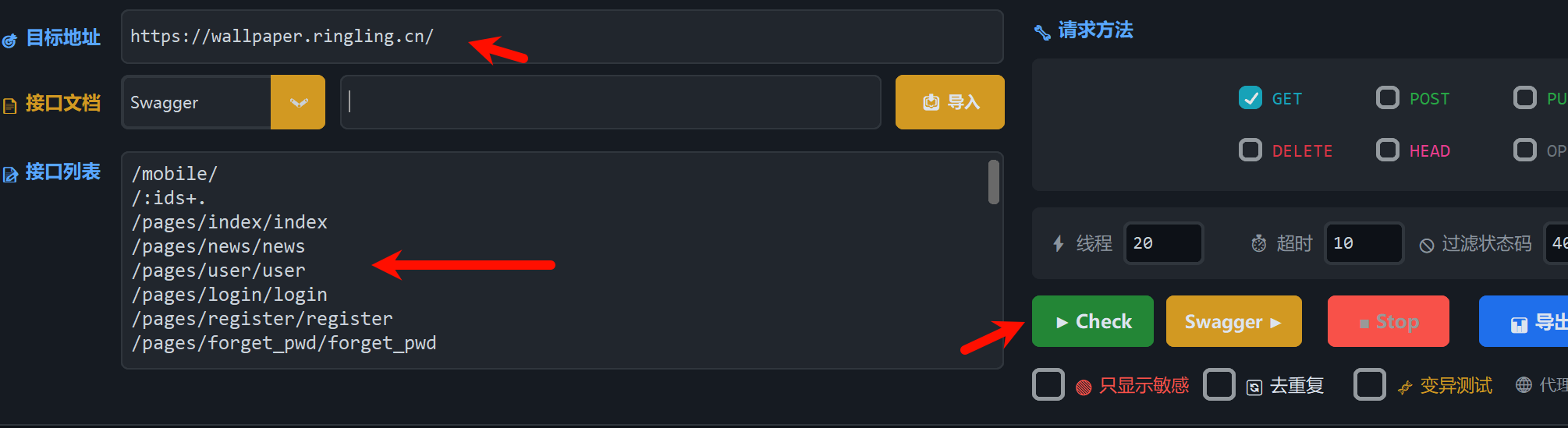](https://github.com/11firefly11/ApiHunter/blob/main/img/dr.png) * **方式二**:切换到“接口文档”区域,输入 Swagger/ASP.NET 地址,点击 **\[导入\]**,然后点击 **\[swagger\]**。 [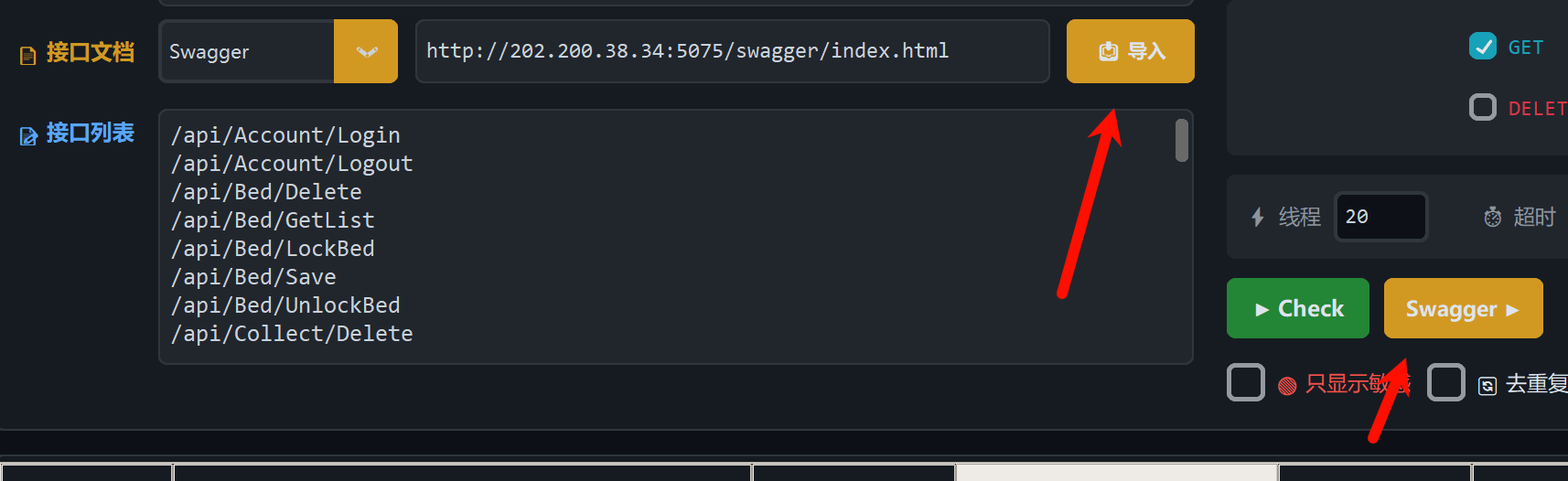](https://github.com/11firefly11/ApiHunter/blob/main/img/%E6%96%87%E6%A1%A3%E5%AF%BC%E5%85%A5.png) 3. **查看结果** * 扫描结果实时显示,敏感信息红色高亮。 * 双击行查看详情,右键可导出或复制。
xiaodi
2026年5月13日 17:44
114
0 条评论
转发
收藏文档
上一篇
下一篇
手机扫码
复制链接
手机扫一扫转发分享
复制链接
分享
链接
类型
密码
更新密码
有效期
Markdown文件
Word文件
PDF文档
PDF文档(打印)