工具项目
BurpSuite明动插件
资产安全巡检平台项目
Nuclei漏扫图形化工具
Nuclei POC辅助编写
分布式资产测绘监控
POC漏检模板管理工具
POC管理与漏检工具
Java幽灵比特位绕过神器
一键扒光虚拟机所有密码
Java内存马生成网页版
263+上传漏检绕过工具
ID注册查询社工利器
Linux后渗透利用神器
全能攻防协议连接神器
聚合多源情报推送监控
应用敏感信息提取神器
分布式资产扫描平台
交互式载荷生成平台
Java审计的瑞士军刀
容器镜像集群扫描器
渗透命令全速查平台
AI驱动日志安全分析系统
AI流量抓包解密利器
BurpSuite26.4专业稳定版
小程序一键反编译带挖掘
渗透测试引导工具箱
一键提取加载分析JS插件
DLL代理与侧载生成器
K8s攻击路径测绘引擎
JS安全分析提取工具
蓝队分析研判工具箱
内存取证可视化工具
小程序安全调试工具
敏感信息提取扫描神器
云安全AK/SK泄露利用工具
Java反序列化GUI工具
HackingTool终端工具箱
可视化未授权访问漏测工具
轻量化红队渗透工具箱
WX小程序安全审计Skill
C#安全内网渗透工具集
JS只能解密渗透测试框架
Linux本地提权通杀项目
自动化信息泄露侦察工具
用户账户调查情报工具
基于API探测路径BP插件
红队自动化巡航扫描框架
OpenArk响应逆向工具箱
自动化泄露资产测绘工具
API接口自动化测试工具
网络设备基线排查工具
LLM大模型红队测试框架
JX逆向发调试浏览器插件
反蜜罐反溯源浏览器插件
小迪安全知识库
-
+
首页
JX逆向发调试浏览器插件
JX逆向发调试浏览器插件
 本插件是基于[Hook\_JS](https://github.com/0xsdeo/Hook_JS)库所写的Google插件,将致力于辅助前端JavaScript逆向以及渗透测试信息收集。 项目地址:https://github.com/0xsdeo/AntiDebug_Breaker ## 教学视频 [](https://github.com/0xsdeo/AntiDebug_Breaker#%E6%95%99%E5%AD%A6%E8%A7%86%E9%A2%91) 反调试:[https://www.bilibili.com/video/BV1gQ4mzMEA4](https://www.bilibili.com/video/BV1gQ4mzMEA4) Vue:[https://www.bilibili.com/video/BV12148z7EnP](https://www.bilibili.com/video/BV12148z7EnP) Hook CryptoJS对称加密 快速出key、iv、mode、padding:[https://www.bilibili.com/video/BV1MPW1zDEK8](https://www.bilibili.com/video/BV1MPW1zDEK8) JS逆向快速定位加密位置以及获取加密密文等加密参数:[https://www.bilibili.com/video/BV1cRyXBaEJX](https://www.bilibili.com/video/BV1cRyXBaEJX) SpiderDemo 靶场练习网站:[https://www.spiderdemo.cn](https://www.spiderdemo.cn/) ## 插件安装 [](https://github.com/0xsdeo/AntiDebug_Breaker#%E6%8F%92%E4%BB%B6%E5%AE%89%E8%A3%85) ### 谷歌插件应用商店安装 [](https://github.com/0xsdeo/AntiDebug_Breaker#%E8%B0%B7%E6%AD%8C%E6%8F%92%E4%BB%B6%E5%BA%94%E7%94%A8%E5%95%86%E5%BA%97%E5%AE%89%E8%A3%85) 地址:[https://chromewebstore.google.com/detail/antidebug-breaker/opkclndfcbafdaecbbaklefnaadopcln](https://chromewebstore.google.com/detail/antidebug-breaker/opkclndfcbafdaecbbaklefnaadopcln) ### 手动安装 [](https://github.com/0xsdeo/AntiDebug_Breaker#%E6%89%8B%E5%8A%A8%E5%AE%89%E8%A3%85) 将源码下载到本地后打开chrome,访问`chrome://extensions/`,点击左上角的`加载未打包的扩展程序`,然后选中源码文件夹即可: [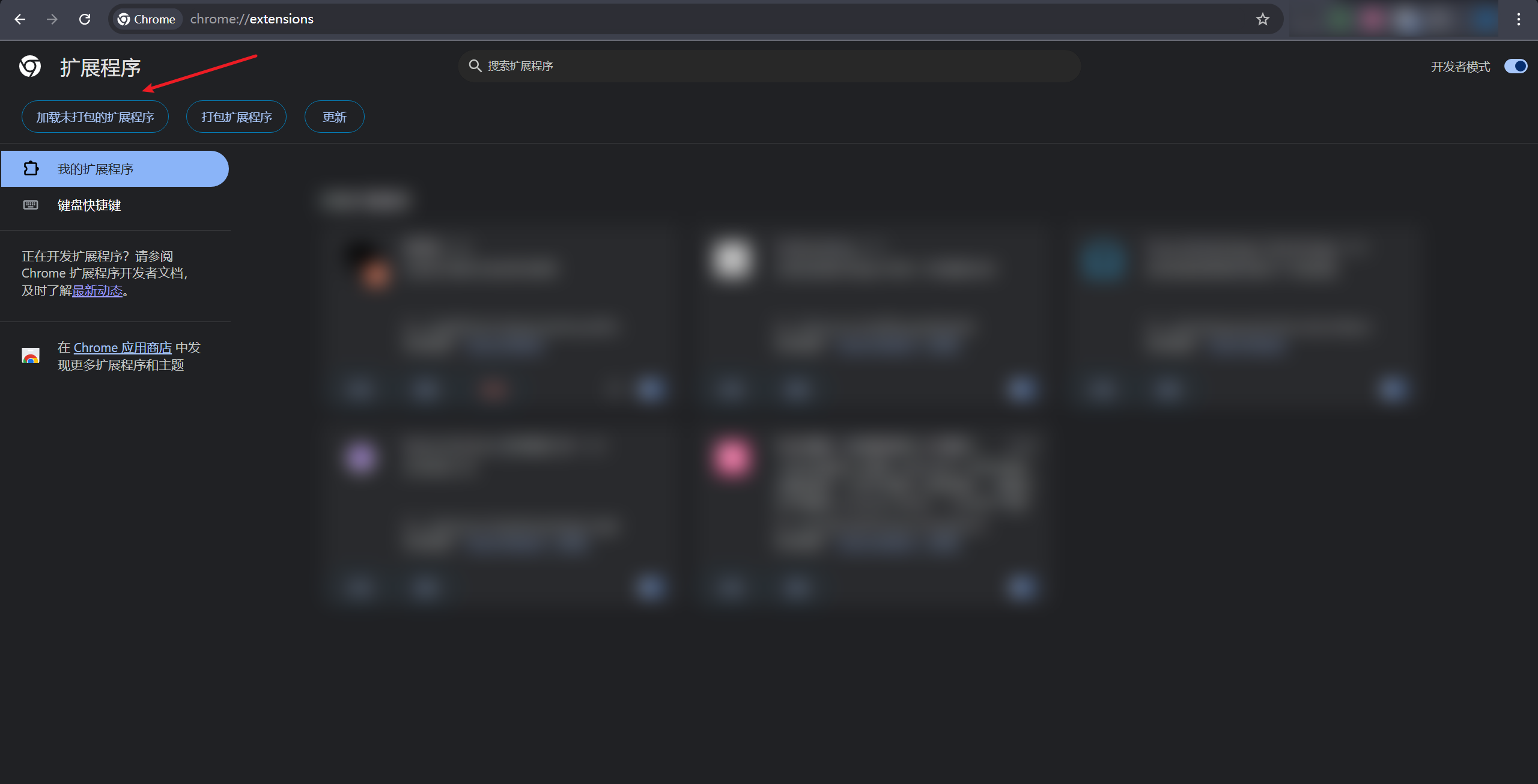](https://github.com/0xsdeo/AntiDebug_Breaker/blob/main/image/README/1753669187234.png) ## 脚本使用场景 [](https://github.com/0xsdeo/AntiDebug_Breaker#%E8%84%9A%E6%9C%AC%E4%BD%BF%E7%94%A8%E5%9C%BA%E6%99%AF) > AntiDebug * [Bypass Debugger](https://github.com/0xsdeo/AntiDebug_Breaker#Bypass_Debugger) * [hook log](https://github.com/0xsdeo/AntiDebug_Breaker#hook_log) * [Hook table](https://github.com/0xsdeo/AntiDebug_Breaker#Hook_table) * [hook clear](https://github.com/0xsdeo/AntiDebug_Breaker#hook_clear) * [hook close](https://github.com/0xsdeo/AntiDebug_Breaker#hook_close) * [hook history](https://github.com/0xsdeo/AntiDebug_Breaker#hook_history) * [Fixed window size](https://github.com/0xsdeo/AntiDebug_Breaker#Fixed_window_size) * [页面跳转JS代码定位通杀方案](https://github.com/0xsdeo/AntiDebug_Breaker#location_href) * [Hook CryptoJS](https://github.com/0xsdeo/AntiDebug_Breaker#Hook_CryptoJS) * [Hook JSEncrypt RSA](https://github.com/0xsdeo/AntiDebug_Breaker#Hook_JSEncrypt_RSA) * [Hook SM-crypto](https://github.com/0xsdeo/AntiDebug_Breaker#Hook_SMcrypto) > Hook * [document.cookie](https://github.com/0xsdeo/AntiDebug_Breaker#document.cookie) * [XMLHttpRequest.setRequestHeader](https://github.com/0xsdeo/AntiDebug_Breaker#XMLHttpRequest.setRequestHeader) * [XMLHttpRequest.open](https://github.com/0xsdeo/AntiDebug_Breaker#XMLHttpRequest.open) * [localStorage.setItem](https://github.com/0xsdeo/AntiDebug_Breaker#localStorage.setItem) * [localStorage.getItem](https://github.com/0xsdeo/AntiDebug_Breaker#localStorage.getItem) * [localStorage.removeItem](https://github.com/0xsdeo/AntiDebug_Breaker#localStorage.removeItem) * [localStorage.clear](https://github.com/0xsdeo/AntiDebug_Breaker#localStorage.clear) * [sessionStorage.setItem](https://github.com/0xsdeo/AntiDebug_Breaker#sessionStorage.setItem) * [sessionStorage.getItem](https://github.com/0xsdeo/AntiDebug_Breaker#sessionStorage.getItem) * [sessionStorage.removeItem](https://github.com/0xsdeo/AntiDebug_Breaker#sessionStorage.removeItem) * [sessionStorage.clear](https://github.com/0xsdeo/AntiDebug_Breaker#sessionStorage.clear) * [fetch](https://github.com/0xsdeo/AntiDebug_Breaker#fetch) * [JSON.parse](https://github.com/0xsdeo/AntiDebug_Breaker#JSON.parse) * [JSON.stringify](https://github.com/0xsdeo/AntiDebug_Breaker#JSON.stringify) * [Promise](https://github.com/0xsdeo/AntiDebug_Breaker#Promise) * [Math.random](https://github.com/0xsdeo/AntiDebug_Breaker#Math.random) * [Date.now](https://github.com/0xsdeo/AntiDebug_Breaker#Date.now) * [performance.now](https://github.com/0xsdeo/AntiDebug_Breaker#performance.now) > Vue * [获取路由](https://github.com/0xsdeo/AntiDebug_Breaker#Get_Vue_0) * [清除跳转](https://github.com/0xsdeo/AntiDebug_Breaker#Get_Vue_1) * [清除路由守卫](https://github.com/0xsdeo/AntiDebug_Breaker#Clear_vue_Navigation_Guards) * [激活Vue Devtools](https://github.com/0xsdeo/AntiDebug_Breaker#detectorExec) > React * [获取路由](https://github.com/0xsdeo/AntiDebug_Breaker#Get_React_0) ### 反调试 [](https://github.com/0xsdeo/AntiDebug_Breaker#%E5%8F%8D%E8%B0%83%E8%AF%95) * [Bypass Debugger](https://github.com/0xsdeo/AntiDebug_Breaker/blob/main/scripts/Bypass_Debugger.js) 该脚本用于绕过**无限Debugger**,目前引起无限Debugger的三种核心方式为: > eval > Function > Function.prototype.constructor 本脚本通过 Hook 以上核心函数有效绕过大部分前端无限 debugger。但因 eval 作用域问题,某些网站可能会报错。此时可切换至火狐浏览器无视debugger进行调试。 注:极少数网站可能采用特殊反制措施(如故意引发eval作用域问题或其他问题),导致前端报错或依然能引起debugger,这种情况需针对性解决。总体而言,**本脚本能覆盖绝大多数场景**。 脚本原理:[JS逆向系列14-Bypass Debugger](https://mp.weixin.qq.com/s/3xagT-PXCgGrw9YiaCe__g) * [hook log](https://github.com/0xsdeo/AntiDebug_Breaker/blob/main/scripts/hook_log.js) 本脚本为[Yosan](https://github.com/lyousan)师傅所作,用于防止js重写console.log等方法。 * [Hook table](https://github.com/0xsdeo/AntiDebug_Breaker/blob/main/scripts/hook_table.js) 绕过js检测运行时间差来实现反调试。 本脚本将针对以下这三种特征的反调试网站(注:包括但不仅限于这以下三种特征,需根据实际情况去判断是否需要使用本脚本): > 频繁调用console.clear清除控制台数据 > 控制台频繁输出大量内容 > 进行完以上两种操作后直接使用location.href进行跳转,一般跳转到主域名为github.io的网站。 如存在以上特征的网站,均可尝试使用本脚本去进行绕过。 脚本原理:[JS逆向系列19-无感绕过一类运行时间差反调试](https://mp.weixin.qq.com/s/JZu-fknVdEpaI5anzSlLjg) * [hook clear](https://github.com/0xsdeo/AntiDebug_Breaker/blob/main/scripts/hook_clear.js) 禁止js清除控制台数据。 脚本原理:[JS逆向系列10-反调试与反反调试](https://mp.weixin.qq.com/s/r-ZcP2knpmoVEK0y_26xBw) * [hook close](https://github.com/0xsdeo/AntiDebug_Breaker/blob/main/scripts/hook_close.js) 重写close,以此来避免网站反调试关闭当前页面。 脚本原理:[JS逆向系列10-反调试与反反调试](https://mp.weixin.qq.com/s/r-ZcP2knpmoVEK0y_26xBw) * [hook history](https://github.com/0xsdeo/AntiDebug_Breaker/blob/main/scripts/hook_history.js) 避免网站反调试返回上一页或某个特定历史页面。 脚本原理:[JS逆向系列10-反调试与反反调试](https://mp.weixin.qq.com/s/r-ZcP2knpmoVEK0y_26xBw) * [Fixed window size](https://github.com/0xsdeo/AntiDebug_Breaker/blob/main/scripts/Fixed_window_size.js) 固定浏览器高度宽度值以绕过前端检测用户是否打开控制台。 固定的宽度高度值: ``` innerHeight:660 innerWidth:1366 outerHeight:760 outerWidth:1400 ``` * [页面跳转JS代码定位通杀方案](https://github.com/0xsdeo/AntiDebug_Breaker/blob/main/scripts/location_href.js) 本脚本为[CC11001100](https://github.com/CC11001100)师傅所作,脚本原地址:`https://github.com/JSREI/page-redirect-code-location-hook`,用于阻断页面跳转,留在当前页面分析。 * [Hook CryptoJS](https://github.com/0xsdeo/AntiDebug_Breaker/blob/main/scripts/Hook_CryptoJS.js) Hook CryptoJS当中的所有 对称&哈希&HMAC算法,例如AES、DES、MD5、SHA等。如果未打印请自查目标站点是否清除了console.log或是否使用的是CryptoJS的加密算法,如果确认使用的是CryptoJS库进行的加密而无法打印可联系我。 * [Hook JSEncrypt RSA](https://github.com/0xsdeo/AntiDebug_Breaker/blob/main/scripts/Hook_JSEncrypt.js) Hook JSEncrypt加密库中的RSA算法,加密时将在控制台打印公钥、原始数据、加密后的密文。解密时将在控制台打印私钥、原始数据、解密后的明文。如果未打印请自查目标站点是否清除了console.log或是否使用的是JSEncrypt的RSA算法,如果确认使用的是JSEncrypt库进行的RSA加密而无法打印可联系我。 * [Hook SM-crypto](https://github.com/0xsdeo/AntiDebug_Breaker/blob/main/scripts/Hook_SMcrypto.js) 本脚本思路与初始形态为[魔法少女☆ホシノ](https://github.com/Hosinoharu)所作。 Hook SM-crypto加密库当中的 SM2、SM3、SM4算法。如果未打印请自查目标站点是否清除了console.log或是否使用的是sm-crypto的加密算法,如果清除了console.log可以尝试使用hook log脚本防止js重写log方法,如果确认使用的是sm-crypto库进行的加密而无法打印可联系我。 ### Hook [](https://github.com/0xsdeo/AntiDebug_Breaker#hook) * [document.cookie](https://github.com/0xsdeo/AntiDebug_Breaker/blob/main/scripts/Hook_cookie.js) 开启本脚本后默认将在控制台打印设置的cookie,如果需要打印特定cookie请在下方输入框中输入cookie名称,脚本将会捕获这些特定cookie名。 * [XMLHttpRequest.setRequestHeader](https://github.com/0xsdeo/AntiDebug_Breaker/blob/main/scripts/hook_xhr_setRequestHeader.js) 开启本脚本后默认将在控制台打印设置的请求头,如果需要打印特定请求头请在下方输入框中输入请求头名称,脚本将会捕获这些特定请求头名。 * [XMLHttpRequest.open](https://github.com/0xsdeo/AntiDebug_Breaker/blob/main/scripts/hook_xhr_open.js) 开启本脚本后默认将在控制台打印初始化xhr请求配置(url,method),如果需要捕获特定url请在下方输入框中输入url名称,脚本将会捕获这些特定url名称。 * [localStorage.setItem](https://github.com/0xsdeo/AntiDebug_Breaker/blob/main/scripts/hook_localStorage_setItem.js) 开启本脚本后默认将在控制台打印设置的localStorage键值,如果需要捕获特定键请在下方输入框中输入键名,脚本将会捕获这些特定键名。 * [localStorage.getItem](https://github.com/0xsdeo/AntiDebug_Breaker/blob/main/scripts/hook_localStorage_getItem.js) 开启本脚本后默认将在控制台打印站点读取的localStorage键名,如果需要捕获特定键名请在下方输入框中输入键名,脚本将会捕获这些特定键名。 * [localStorage.removeItem](https://github.com/0xsdeo/AntiDebug_Breaker/blob/main/scripts/hook_localStorage_removeItem.js) 开启本脚本后默认将在控制台打印移除的localStorage键名,如果需要捕获特定键名请在下方输入框中输入键名,脚本将会捕获这些特定键名。 * [localStorage.clear](https://github.com/0xsdeo/AntiDebug_Breaker/blob/main/scripts/hook_localStorage_clear.js) 开启本脚本后如果站点进行了清空localStorage动作,默认会在控制台打印消息。 * [sessionStorage.setItem](https://github.com/0xsdeo/AntiDebug_Breaker/blob/main/scripts/hook_sessionStorage_setItem.js) 开启本脚本后默认将在控制台打印设置的sessionStorage键值,如果需要捕获特定键请在下方输入框中输入键名,脚本将会捕获这些特定键名。 * [sessionStorage.getItem](https://github.com/0xsdeo/AntiDebug_Breaker/blob/main/scripts/hook_sessionStorage_getItem.js) 开启本脚本后默认将在控制台打印站点读取的sessionStorage键名,如果需要捕获特定键名请在下方输入框中输入键名,脚本将会捕获这些特定键名。 * [sessionStorage.removeItem](https://github.com/0xsdeo/AntiDebug_Breaker/blob/main/scripts/hook_sessionStorage_removeItem.js) 开启本脚本后默认将在控制台打印移除的sessionStorage键名,如果需要捕获特定键名请在下方输入框中输入键名,脚本将会捕获这些特定键名。 * [sessionStorage.clear](https://github.com/0xsdeo/AntiDebug_Breaker/blob/main/scripts/hook_sessionStorage_clear.js) 开启本脚本后如果站点进行了清空sessionStorage动作,默认会在控制台打印消息。 * [fetch](https://github.com/0xsdeo/AntiDebug_Breaker/blob/main/scripts/hook_fetch.js) 开启本脚本后默认将在控制台打印fetch请求设置。 * [JSON.parse](https://github.com/0xsdeo/AntiDebug_Breaker/blob/main/scripts/hook_json_parse.js) 开启本脚本后默认将在控制台打印传入的JSON,如果需要捕获特定JSON请在下方输入框中输入JSON,脚本将会捕获这些特定JSON字符串。 * [JSON.stringify](https://github.com/0xsdeo/AntiDebug_Breaker/blob/main/scripts/hook_json_stringify.js) 开启本脚本后默认将在控制台打印传入JSON.stringify的值。 * [Promise](https://github.com/0xsdeo/AntiDebug_Breaker/blob/main/scripts/hook_Promise.js) 本脚本为[Yosan](https://github.com/lyousan)师傅所作。 将在控制台打印Promise的resolve参数,可快速定位异步回调位置。 * [Math.random](https://github.com/0xsdeo/AntiDebug_Breaker/blob/main/scripts/hook_random.js) 固定Math.random返回值 * [Date.now](https://github.com/0xsdeo/AntiDebug_Breaker/blob/main/scripts/Hook_Date_now.js) 固定Date.now返回值 * [performance.now](https://github.com/0xsdeo/AntiDebug_Breaker/blob/main/scripts/hook_performance_now.js) 固定performance.now返回值 ### Vue [](https://github.com/0xsdeo/AntiDebug_Breaker#vue) * [获取路由](https://github.com/0xsdeo/AntiDebug_Breaker/blob/main/scripts/Get_Vue_0.js) 获取已加载的路由并显示在下方的表格中,注意未加载的路由不会被获取到,如果长时间未获取到可能是由于目标站点未使用vue router,也可能是因为目标站点未加载完毕。 * [清除跳转](https://github.com/0xsdeo/AntiDebug_Breaker/blob/main/scripts/Get_Vue_1.js) 本脚本将清除vue router的跳转方法,如果清除后依然会跳转,一方面可能是由于注入的脚本还未清除跳转方法,网站就调用了方法进行跳转,此时可以考虑手动替换js清除跳转方法。另一方面可能是由于在代码中调用的不是vue router的跳转方法,此时可以考虑开启反调试板块中的hook close或hook history脚本,再或者打开页面跳转JS代码定位通杀方案脚本,定位到跳转的函数并替换清除。 * [清除路由守卫](https://github.com/0xsdeo/AntiDebug_Breaker/blob/main/scripts/Clear_vue_Navigation_Guards.js) 仅清除全局前置守卫(beforeEach)和全局解析守卫(beforeResolve),如果清除后网站控制台显示报错,可能是由于在路由守卫中做了动态加载等其他操作,此时可以考虑关闭本脚本并亲自替换js逻辑实现绕过。 脚本原理:[最大化收集Vue框架(SPA类型)下的js](https://mp.weixin.qq.com/s/klhBr2V7UJpspiAmRY1DXQ) * [激活Vue Devtools](https://github.com/0xsdeo/AntiDebug_Breaker/blob/main/scripts/detectorExec.js) 本脚本引用自[vue-force-dev](https://github.com/hzmming/vue-force-dev)。 当开启本脚本后将激活Vue Devtools。Vue2需开启Vue.js devtools(v5),Vue3需开启Vue.js devtools,可自行去谷歌插件商店安装上述两个插件。注:1.上述两个插件不能同时开。2.当下方没有检测到Vue Router时并不能代表网站不是Vue框架,只能说明网站并没有使用Vue Router。 ### React [](https://github.com/0xsdeo/AntiDebug_Breaker#react) * [获取路由](https://github.com/0xsdeo/AntiDebug_Breaker/blob/main/scripts/Get_React_0.js) 获取已加载的路由并显示在下方的表格中,注意未加载的路由不会被获取到,如果长时间未获取到可能是由于目标站点未使用react router,也可能是因为目标站点未加载完毕。 ## 插件使用注意事项 [](https://github.com/0xsdeo/AntiDebug_Breaker#%E6%8F%92%E4%BB%B6%E4%BD%BF%E7%94%A8%E6%B3%A8%E6%84%8F%E4%BA%8B%E9%A1%B9) 1. 本插件目前不支持火狐。 2. 进入网页后,无论是开启脚本还是关闭脚本,需刷新页面后才会生效。 3. **更新插件时请将旧版本插件从浏览器中移除再导入新版插件。**
xiaodi
2026年5月14日 17:06
4
0 条评论
转发
收藏文档
上一篇
下一篇
手机扫码
复制链接
手机扫一扫转发分享
复制链接
分享
链接
类型
密码
更新密码
有效期
Markdown文件
Word文件
PDF文档
PDF文档(打印)